How to Make a Wedding Guest List and Track RSVPs (Free Spreadsheet Method)
By Altar & Agenda · Updated
Your guest list touches almost every other part of the wedding: the venue size, the catering bill, the invitations, the seating chart and the thank-you notes. Get it organized early and those later jobs get much easier. Leave it scattered across group chats and a notes app, and the final headcount week becomes a scramble.
Here's a simple guest list and RSVP system you can set up in Excel or Google Sheets in about half an hour.
On this page
- Start with one rule: one row per invitation
- Step 1: Build the list in tiers
- Step 2: Collect addresses once
- Step 3: Know your RSVP timeline
- Step 4: Track replies as they come in
- Step 5: Follow up without the awkwardness
- Step 6: Turn RSVPs into a seating chart
- Step 7: Give the final headcount
- Step 8: Thank-you notes
- Common guest list mistakes
- Frequently asked questions
- Want it set up for you?
Start with one rule: one row per invitation
The most useful guest list decision is also the simplest. Make one row per invitation (per household), not one row per person, and add a "party size" column.
| Invitation name | Party size | Address | Side | Group | Invited to | RSVP | Attending | Meal choices | Dietary notes | Table | Gift | Thank-you sent |
|---|---|---|---|---|---|---|---|---|---|---|---|---|
| Jamie Lee | 1 | Partner A | College friends | Ceremony + reception | Yes | 1 | Chicken | 4 | ||||
| Sam & Alex Rivera | 2 | Partner B | Family | Ceremony + reception | Pending |
(Names above are fictional.)
Why per invitation? Because that's how invitations go out, how RSVPs come back and how thank-you notes get sent. One address per row means your list doubles as your envelope list. Headcounts still work: just add up the party-size or "attending" column.
Step 1: Build the list in tiers
Before you add addresses, agree on the shape of the list.
- Set a target number based on your budget and venue capacity. Guest count is one of the biggest drivers of cost: The Knot's 2026 Real Weddings Study found couples spent an average of about $292 per guest in 2025.
- Split it between sides (or between each of you and any contributing family) however feels fair.
- Sort guests into tiers: A-list (must invite), B-list (would love to), C-list (only if there's room).
- Use a "Group" column (family, college friends, work, neighbors) to help with seating later and to spot any group that's grown out of proportion.
Remember that not everyone will come: about 20% of invited guests decline on average, more for out-of-town guests. Our guide to how many wedding guests to invite and the free guest count calculator help you estimate your real headcount.
If you're over your target, the tiers do the arguing for you. Cut from the bottom tier, or cut whole groups. Removing an entire group (all coworkers, say) is easier to explain than picking individuals.
Step 2: Collect addresses once
Send one message asking everyone for their mailing address, or use a simple online form. Paste the answers straight into the list. You'll use the same addresses for save-the-dates, invitations and thank-you notes, so collecting them once saves three rounds of chasing.
Step 3: Know your RSVP timeline
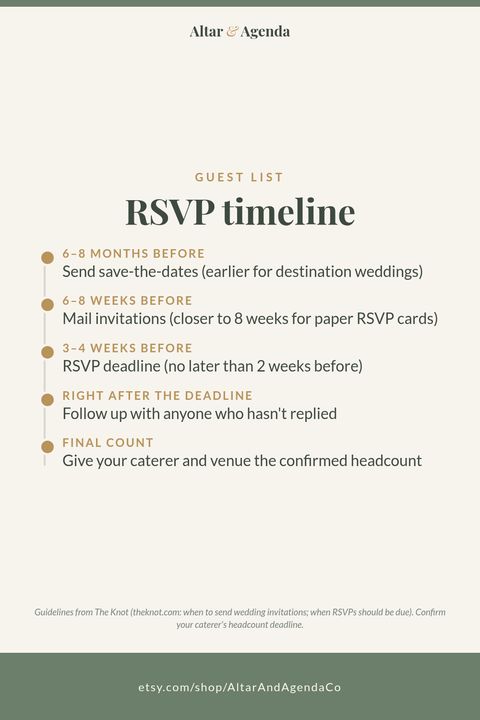
A common timeline looks like this:
- Save-the-dates: 6 to 8 months before the wedding (earlier for destination weddings).
- Invitations: 6 to 8 weeks before (closer to 8 if guests mail back RSVP cards).
- RSVP deadline: 3 to 4 weeks before the wedding, and no later than 2.
- Follow-up: a few days after the deadline, contact everyone who hasn't replied.
If guests can RSVP online, put the link on your wedding website. Here's what to put on a wedding website.
Put your RSVP deadline at the top of the spreadsheet and add a "days until RSVP deadline" cell: =RSVPDeadline-TODAY(). A visible countdown makes it much harder to forget.
Step 4: Track replies as they come in
When an RSVP arrives, update three columns: RSVP (Yes / No / Pending), Attending (how many from that invitation are coming) and Meal choices.
Then add a small summary area at the top:
- Invited:
=SUM(PartySize) - Attending:
=SUMIFS(Attending,RSVP,"Yes") - Declined:
=SUMIFS(PartySize,RSVP,"No") - Still waiting:
=SUMIFS(PartySize,RSVP,"Pending") - Meal counts: a
COUNTIF(orSUMIFSif you record meals per invitation) for each menu option
That summary is exactly what your caterer will ask for, so you can send it in one screenshot.
Step 5: Follow up without the awkwardness
After the deadline, filter the list for RSVP = "Pending". That's your follow-up list. A short, friendly message works best:
"Hi! We're finalizing numbers with our caterer this week. Will you be able to join us on the 14th? Totally fine either way, we just want to save you a seat!"
Add a "Followed up" column with the date you messaged, so you know who's had a nudge and who hasn't.
It's also worth making a few other filtered views: guests with dietary notes (for the caterer), guests who still need a table (for seating), gifts received with no thank-you sent yet, and plus-ones who haven't given a name.
Step 6: Turn RSVPs into a seating chart
Start seating once most RSVPs are in. (For table sizes, etiquette and more formulas, see our full wedding seating chart guide.) Add a "Table" column and a small table-summary area: one row per table with its capacity and a SUMIF of attending guests assigned to it. Then:
- Seat by group first (family, friends, work), then fine-tune.
- Fill each table to capacity before starting a new one.
- Keep a filtered view of attending guests with no table yet. When it's empty, you're done.
Step 7: Give the final headcount
About two weeks before the wedding, most caterers and venues want a final number. Your summary already has it: attending total, meal counts and a list of dietary notes. Send it, then lock the list. Late changes after this point should go straight to your day-of point person.
Step 8: Thank-you notes
Use the same list after the wedding. Log each gift next to the guest's name and tick "Thank-you sent" as you go. A common etiquette guideline is to send a note within about two weeks for gifts received before the wedding and within about three months for gifts at or after it. Thank every guest who came, gift or not.
Common guest list mistakes
- Counting people per row and invitations per row in the same list. Pick per invitation and stick to it.
- Not tracking who's invited to what. If some guests are ceremony-only or rehearsal-dinner guests, give it a column.
- No RSVP deadline buffer. A deadline two weeks before the wedding leaves no room to chase replies and get the headcount to your caterer.
- Updating the list in more than one place. Keep one master list and share view access with anyone helping.
Frequently asked questions
What columns should a wedding guest list have?
At minimum: invitation name, party size, address, side, group, RSVP status, number attending, meal choices, dietary notes and table. Add gift and thank-you columns to reuse the list after the wedding.
Should a guest list have one row per person or per household?
One row per invitation (household) with a party-size column. It matches how invitations, RSVPs and thank-you notes work, and headcounts still add up correctly.
When should RSVPs be due?
About three to four weeks before the wedding, so you have time to chase late replies before giving your caterer a final count (usually about two weeks out).
How do I follow up on missing RSVPs?
A day or two after the deadline, filter for pending replies and send a short, friendly message. Log the date you followed up so nobody gets nudged twice.
How many guests will decline?
About 20% is a common rule of thumb, with more declines from out-of-town and destination guests. Plan your venue and budget for the full invited list anyway.
Want it set up for you?
You can build all of this in a blank spreadsheet. If you'd rather start with it done, our Guest List & RSVP Manager for Excel and Google Sheets has 350 guest rows, automatic headcounts and meal counts, an RSVP countdown, ready-made follow-up lists and a seating chart. It also pairs with our Wedding Budget Tracker (Etsy shows a discount when you buy the two together), and both come in the Wedding Planner Bundle.
Just getting started? Grab the free 12-month wedding planning checklist.
Sources
- The Knot, The Average Wedding Cost (2026 Real Weddings Study): cost per guest.
- The Knot, When Should Wedding RSVPs Be Due? and What Percentage of Wedding Guests RSVP Yes?.
Disclosure: Altar & Agenda makes the templates linked above. Timelines are common guidelines (based on The Knot's etiquette guidance); adjust them for your wedding.
Free: one-page 12-month wedding checklist
60 tasks from "set your budget" to thank-you notes. PDF, no sign-up.
Get the free checklistBrowse our planners on Etsy