How to Make a Wedding Seating Chart in Excel or Google Sheets
By Altar & Agenda · Updated
The seating chart has a reputation as the worst wedding job, mostly because couples try to do it on paper, with sticky notes, while RSVPs are still arriving. Done in a spreadsheet, after most replies are in, it's usually one focused evening.
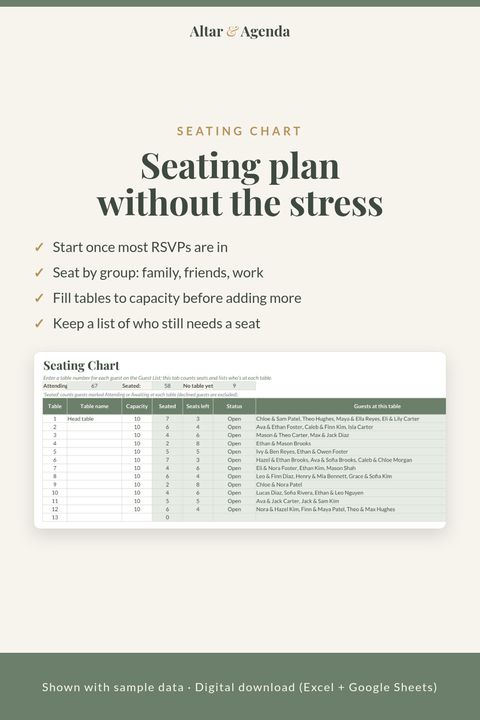
This guide covers how many guests fit at each table size, a step-by-step method for building the chart in Excel or Google Sheets, a few formulas that catch mistakes automatically, and how to handle the tables everyone worries about.
On this page
- When to make your seating chart
- How many guests fit at each table?
- Step 1: Start from your guest list
- Step 2: Filter to confirmed guests only
- Step 3: Set up a table summary
- Step 4: Seat by group first
- Step 5: Fine-tune the tricky tables
- Step 6: Lay out the room
- Step 7: Hand it off
- Frequently asked questions
- Want it set up for you?
When to make your seating chart
Start once most RSVPs are in, typically two to three weeks before the wedding, and finish before your caterer's final headcount deadline. Many caterers need table numbers and meal choices with the final count, and stationers need the final list to print escort cards or a seating display.
If you start earlier, you'll redo it. If you start later, you'll be doing it the week of the wedding.
How many guests fit at each table?
The table size decides how many tables you need, so check with your venue or rental company what they stock. These are the standard capacities published by rental companies:
| Table | Comfortable for a plated dinner | Maximum |
|---|---|---|
| 48-inch round | 4 to 5 | 6 |
| 60-inch round (the most common) | 8 | 10 |
| 66-inch round | 8 to 9 | 10 to 11 |
| 72-inch round | 10 | 12 |
| 8-foot banquet (rectangle) | 8 | 10 with ends |
The difference comes down to space per person. A full place setting needs about 24 inches of table edge, so a 60-inch round (about 188 inches around) seats 8 comfortably; squeezing in 10 leaves each guest under 19 inches. Wide upholstered chairs, large centerpieces and a formal plated meal all push you toward the lower number. Buffets and slim chairs make the maximum workable.
Tables needed = attending guests ÷ seats per table, rounded up. For 115 guests at 8 per table, that's 15 tables (14.4 rounded up). Leave one or two seats spare across the room for last-minute changes.
Step 1: Start from your guest list
Your seating chart should come straight from your guest list, not a separate list. If your guest list has one row per invitation (household), add one row per attending person on a new tab, or add a "Table" column next to each guest's name.
You'll need these columns:
| Guest name | Invitation | Side | Group | Meal | Dietary notes | Table |
|---|---|---|---|---|---|---|
| Jamie Lee | Jamie Lee | Partner A | College friends | Chicken | 4 | |
| Sam Rivera | Sam & Alex Rivera | Partner B | Family | Vegetarian | Nut allergy | 2 |
(Names are fictional.) The Group column does most of the work. If you set up your guest list with groups like "College friends", "Work" or "Mom's side", seating becomes sorting. Our guest list and RSVP guide shows how to set that up from the start.
Step 2: Filter to confirmed guests only
Filter the list to guests who've said yes. Don't seat people who haven't replied; keep them in a separate "pending" view and seat them last.
Step 3: Set up a table summary
On a new tab, make one row per table:
| Table | Capacity | Seated | Seats left | Status |
|---|---|---|---|---|
| 1 | 10 | =COUNTIF(Guests!G:G,A2) |
=B2-C2 |
=IF(C2>B2,"OVER",IF(C2=B2,"Full","Open")) |
Copy the row down for every table. Now every time you type a table number next to a guest, the summary updates, and any table you've overfilled shows "OVER". Add conditional formatting to turn "OVER" red.
Two more cells catch the most common mistakes:
- Guests without a table:
=COUNTIFS(Guests!G:G,"",Guests!A:A,"<>") - Total seated vs. attending:
=SUM(C:C)next to your attending total. They should match.
Step 4: Seat by group first
Work in this order, which is how most planners approach it:
- The couple's table. A sweetheart table for two, a head table with the wedding party, or a family table. Decide this first, because it shapes everything else.
- Immediate family, near the couple and the dance floor.
- Big groups that sit together naturally: college friends, work friends, a sports team. Fill tables to capacity before starting new ones.
- Extended family, often grouped by side.
- The leftovers. Every wedding has a few guests who don't fit a group. Seat them with people of similar age or interests, or with the most welcoming table you have.
Sort the guest list by Group and type table numbers down the column. It's much faster than dragging names around a diagram.
Step 5: Fine-tune the tricky tables
- Divorced parents: give each their own family table, at an equal distance from the couple, and don't make anyone choose.
- Plus-ones: always seat guests with the person they came with.
- Kids: young children sit with their parents. A kids' table works for children over about six, ideally near their parents.
- Older guests: away from the speakers, near exits and restrooms, with an easy path to their seat.
- Singles: a "singles table" can feel pointed. Seat single guests by shared interests instead.
- People who don't get along: opposite sides of the room, not just different tables.
Step 6: Lay out the room
Ask your venue for a floor plan with table positions and numbers. Then:
- Put the couple's table where everyone can see it, often near the dance floor.
- Number tables so they're easy to find, with table 1 nearest the couple.
- Leave clear paths for servers and guests with mobility needs.
Rental companies often suggest about 54 to 60 inches between tables so there's room for chairs and a walkway.
Step 7: Hand it off
Once the chart is final:
- Send the caterer a list of each table's meal choices and dietary notes. Sorting the guest tab by Table, then Meal, gives you this instantly.
- Send the stationer an alphabetical list (by last name) with table numbers for escort cards or a seating display. Alphabetical is easiest for guests to scan.
- Give your day-of point person a printed copy, in case anyone can't find their seat.
Frequently asked questions
When should you start your wedding seating chart?
When most RSVPs are back, usually two to three weeks before the wedding. Finish it before your caterer's final headcount deadline.
How many guests can sit at a 60-inch round table?
Eight comfortably, ten at most. For a plated dinner with full place settings, eight is the safer choice.
Do you need a seating chart for a small wedding?
Not always. For under about 40 guests, open seating can work well. For larger weddings, or if you're serving plated meals with choices, a chart helps the caterer and avoids a scramble for seats.
Should a seating chart be alphabetical or by table?
Alphabetical by last name is easiest for guests, because they look for their own name. Arranging by table looks lovely but makes guests search every table.
What about guests who RSVP late?
Leave one or two spare seats across the room. Late guests can slot into a table with a spare seat without redoing the chart.
Want it set up for you?
Our Guest List & RSVP Manager for Excel and Google Sheets includes a 30-table seating chart that fills from your guest list, showing each table's capacity, seats left, over-capacity flags and the names seated there. It's also part of the Complete Wedding Planner, which comes in a blush version too. Not sure how many guests to expect yet? Try our free guest count calculator.
Sources
- Stuart Rental, Seating Arrangement Guide: table capacities and spacing between tables.
- Party Savvy, Table Seating Size Guide: round and banquet table capacities.
- SeatPlan, How Many People Can Sit at a Round Table?: comfortable vs. maximum seating and space per place setting.
Disclosure: Altar & Agenda makes the templates linked above. Table capacities vary with chair width, place settings and centerpieces, so confirm with your venue or rental company.
Free: one-page 12-month wedding checklist
60 tasks from "set your budget" to thank-you notes. PDF, no sign-up.
Get the free checklistBrowse our planners on Etsy